

Feedback collected at the end of a course arrives too late to change it. Feedback collected during the lecture can change the next ten minutes. Ask for it in small pieces: a pulse check, the muddiest point, one line on the way out. In Diaposi Session, one tap under each slide says Got it or Review, while there is still time to act.
What kind of feedback can you act on straight away?
Small and specific. “How was the course?” in the last week changes nothing for the people who took it. “Which part of the last twenty minutes was least clear?” changes what you do in the next ten. Feedback during the session should be quick to give, quick to read, and about something you can still adjust.
Which four methods work?
- The pulse check. A one-question poll: too fast, about right, too slow.
- The muddiest point. One line on what is least clear so far.
- The question stream. Anonymous questions collected all session show where people are stuck.
- The exit ticket. One question answered in the last minute, read before the next session.
How do you close the loop?
Say what you heard and what you will do about it. “Half of you found the last section too fast, so I will redo the example” takes ten seconds and is the reason people answer next time. Feedback that disappears teaches the room to stop giving it.
If the feedback shows people are lost, the next step is in how to check understanding during a lecture or training. If a few people never answer, see how to get quiet participants to join in.
How Diaposi Session helps
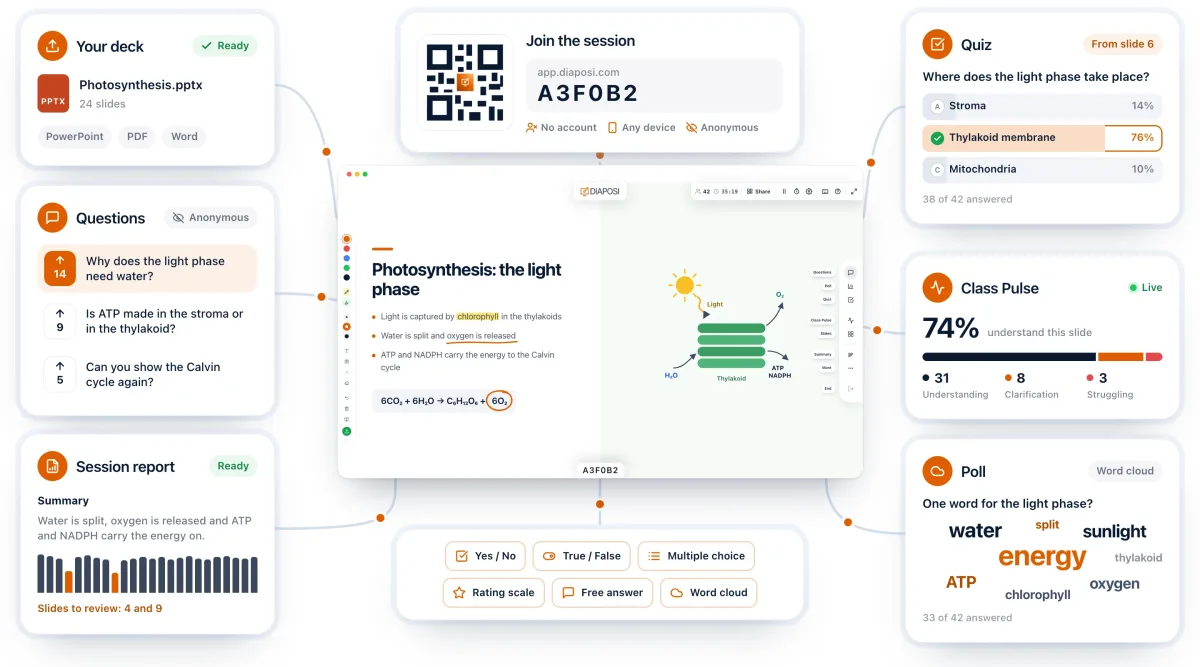
In Diaposi Session the pulse check is built into the slide. One tap under each slide says Got it or Review, so you see understanding while there is still time to act, and a slim line under your slide shows how the room is taking what is on screen. Questions come in anonymously all session, and all of it lands in the report afterwards.
Diaposi Session is part of Diaposi, the EdTech platform for interactive and measurable learning. Discover Diaposi Session
Frequently asked questions
How often should I ask for feedback during a lecture?
- Once or twice per session is enough for a direct question such as the muddiest point. Continuous signals, like a tap on each slide, can run all the time because they ask nothing extra.
Should real-time feedback be anonymous?
- Yes. People tell you a section was unclear when it costs them nothing to say so.
Is Diaposi free?
- Yes. Diaposi is free, and there is no paid plan today.