
Make every lecture interactive, and keep what was learned. Interactive lecture from the document you already use.
Present the deck you already have, with live Q&A, polls and quizzes on the slides. Participants join by QR code in seconds, and every session leaves a report and a learning space to study from.














Universities, institutes and students from all over the world use Diaposi
What educators say
Seeing when my students' attention drops, and on which slide, is a blast. It helps me improve how I teach.
Enrique R.Educator
Letting students react with a like or a dislike on each slide is genius: a signal that helps educators and students adapt how they teach and learn.
Peter F.Educator
With Diaposi I could compare two lectures, the same presentation with two different study groups, from all the signals sent, attention and time on each slide, and adapt my teaching methods.
Erica L.Educator
What changes in the lecture hall
See what the room understood, slide by slide
Launch a poll or a quiz on the slide you are on. Answers arrive anonymously unless it asks for names, and the pulse shows where the room is lost while there is still time to go back.
Let the quiet ones ask
Questions are typed from a phone, anonymous if the participant wants, and voted up by the room so the most shared one reaches you first.
Instant poll, 12 kinds
Launch a poll on the slide you are on: multiple choice, word cloud, ranking, guess the number and more. Anonymous or named, results live in bars, a donut or a pie.
Easy to start: upload your file before you plug into the big screen, and go live in under 30 seconds with Diaposi.
Bring the deck you already teach from
Drop your PowerPoint, PDF or Word file. The slides stay exactly as they are, nothing to rebuild.
Your deck, uploaded
PowerPoint, Word or PDF
Invite the lecture hall
Show the QR code or the 8-digit code. Participants join from a phone, laptop or tablet, no account needed.
diaposi.com

Join with
81642395
No app neededNo account neededJoin in secondsTeach it live
Launch Q&A, polls and quizzes on your slides, and follow the room's pulse as you speak.
What do you expect to learn from this session?
24
/ 31 participants have answered
Start presentation
The interactive whiteboard comes with it
Open a board between two slides: everyone draws, writes and votes from a phone, laptop or tablet, and the board stays with the session.
Try the interactive whiteboard
What you can run in a lecture
- Live Q&AQuestions voted by the room, answered live
- Live quizQuestions from your slides, with a podium
- Live mock examA full exam for the room, marked out of 20
- Live surveyRatings and free answers, nothing marked
- Session spaceEvery session, its statistics and its report
- Opening questionWhat the room expects first
- TimerTime an activity in one click
- Whiteboard between slidesOpen a board mid-deck
- Edit your slidesRearrange slides in the session
- Host notes on the slidesYour notes beside each slide
A live quiz, written from your document
Diaposi writes the questions from your slides
Pick a chapter, the difficulty, the number of questions and a timer. Diaposi writes the questions from your document, or you write your own.
Run it on the big screen while you present
The room answers from their phones, together or at each one's pace, with a leaderboard and a podium.
Once the lecture ends: review what the room understood, run it again next term, or turn it into a live mock exam
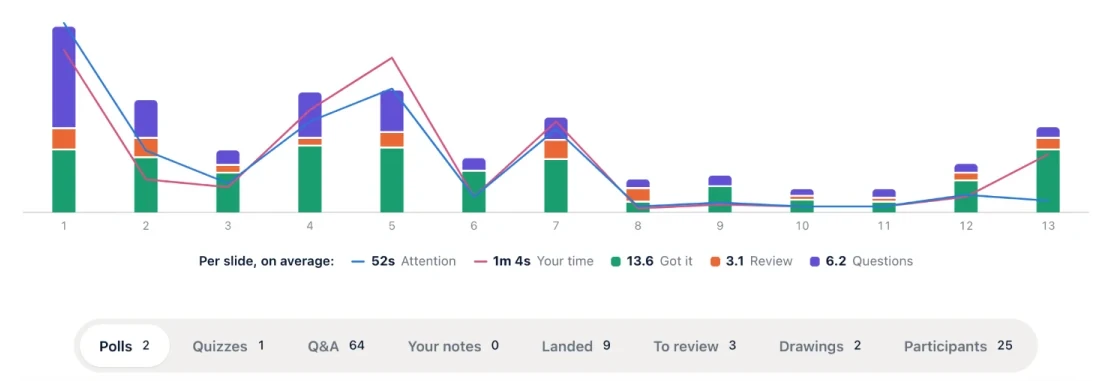
Finish with the analytics of your session
Collect what landed, what still needs a second pass, and where attention dropped, slide by slide.
Run it again or compare groups
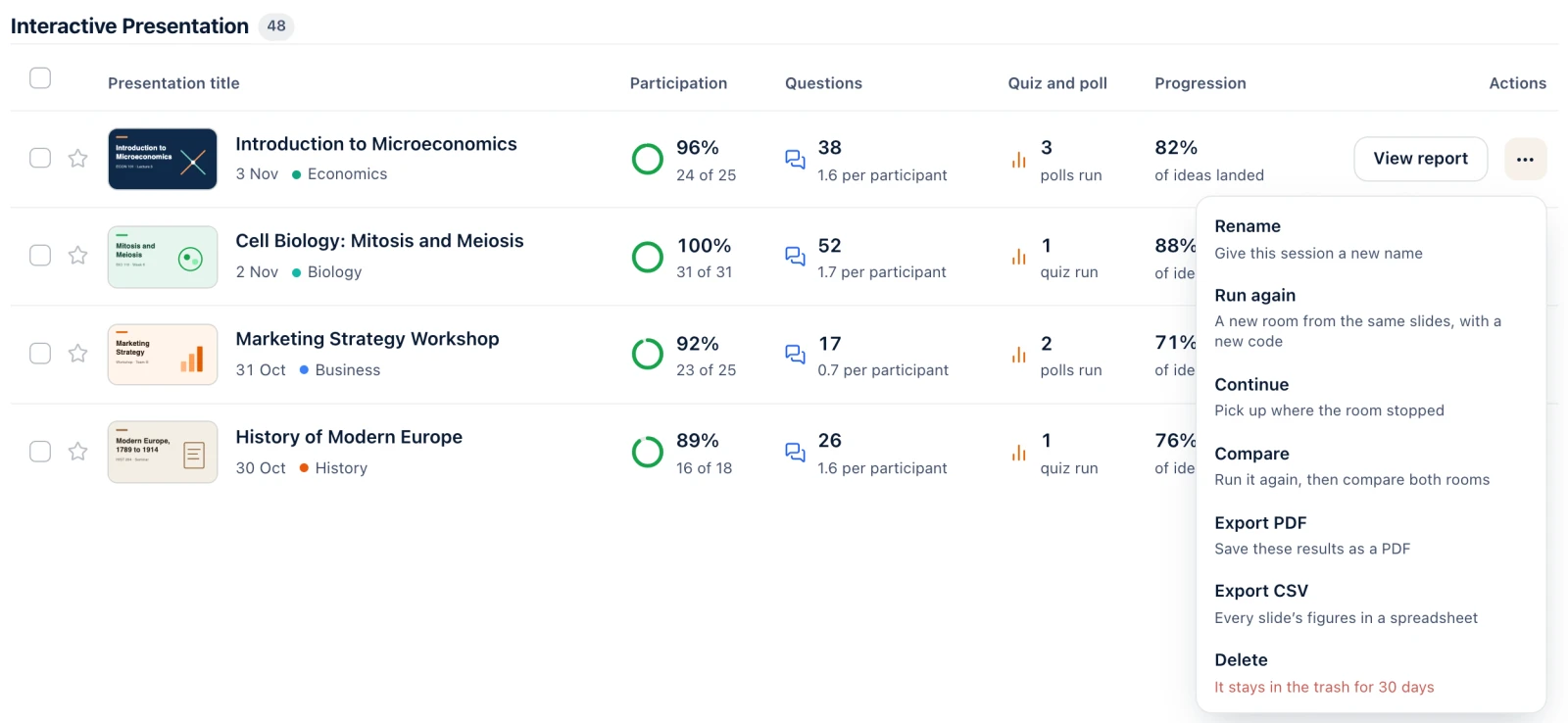
Every session stays in your space: rename it, run it again with a new code or compare two rooms.
Why Diaposi, and not another tool
Six things a lecturer, a department and an IT team ask for, in one tool.
Your deck, as it is
PowerPoint, PDF or Word, uploaded in one go. Nothing to rebuild in another editor, nothing to install in PowerPoint, and the slides look exactly as you made them.
A signal per slide, not per lecture
Attention, understood, to review and questions, on each slide as you teach. You see where the room drops while there is still time to go back, and the report keeps it slide by slide.
Every student keeps a learning space
After the lecture, your slides become each student's own space: every page explained, quizzes, flashcards and a mock exam built from them, with their notes.
See what a student getsQuizzes and mock exams written from your slides
Pick a chapter, a level and a number of questions. Diaposi writes them from your material, marked out of 20, live in the lecture hall or in self-study.
Everything in one tool
Anonymous Q&A voted by the room, 12 kinds of poll, surveys, the interactive whiteboard and the report: one tool, one account for the host, none for the students.
European from end to end, free to start
Hosted in Europe, AI on Mistral, GDPR controls, and your files are never used to train models. Free to start, with no credit card; talk to us for a department or an institution.
Diaposi in other rooms
Frequently asked questions
Do we have to change how we teach?
No. Upload the deck you already use and present it as it is. Diaposi adds a question, a poll, a quiz or the board when you open one, and stays out of the way when you do not.
What do participants need to take part?
A phone, a tablet or a laptop with a browser. They scan the QR code on screen or type the 8-digit code, with nothing to install and no account to create.
Is our material private?
Yes. The upload is secure and each document is private by default. Only the people who join that session see its slides.
Where is the data held, and is it used to train models?
On European infrastructure, with GDPR controls. Diaposi runs its AI on Mistral, and what you upload is never used to train models.
What does a department get after a session?
A report of the whole session, slide by slide, with the questions, the polls and the quizzes as they happened. It can be shared with the course team and the department.
What does it cost?
It is free to start, with no credit card: every account comes with monthly credits for hosting and for learning. For a department or an institution, contact us and we build the offer around your courses.
Does it work with our LMS and our tools?
Diaposi runs in the browser, beside what you already use: nothing to install, a QR code or a link is enough, in the lecture hall as well as remotely. For an integration with your environment, talk to us.
Can we start with one course rather than the whole institution?
Yes. A single course, a department or everything at once: tell us what you have in mind and we set it up around the material your staff already have.
Start with one course.
A single course, a department or the whole institution: the deck your team already has is enough to begin.