

A live poll is a question the whole room answers at once, with the result on screen in seconds. It works when the question takes ten seconds to answer and when you say what you will do with the result. Diaposi Session has six kinds of poll, and the results appear under your slide while it stays on screen.
What is a live poll for?
A poll does one of two things: it tells you something about the room, or it makes the room commit to an answer before you give yours. The first helps you adjust. The second helps people learn, because a wrong prediction is remembered. A poll that does neither, asked only to keep people awake, is noise.
When should you poll, and with what kind of question?
- Before a topic. A prediction or a show of experience: yes or no, or a few options.
- During. A check on the idea you just explained: one right answer among plausible wrong ones.
- After. A rating, or an open answer on what is still unclear.
- To decide. A vote on what to cover next or which example to work through.
How do you write the question and read the result?
Write it so it can be answered in ten seconds: one idea, short options, no trick wording. Then read the result out loud. A clear majority lets you move on. A split is the useful case: ask neighbours to convince each other for two minutes, then poll again. Never show a result and move on in silence.
More on the same idea in how to check understanding during a lecture or training, and in the complete guide to interactive presentations.
How Diaposi Session helps
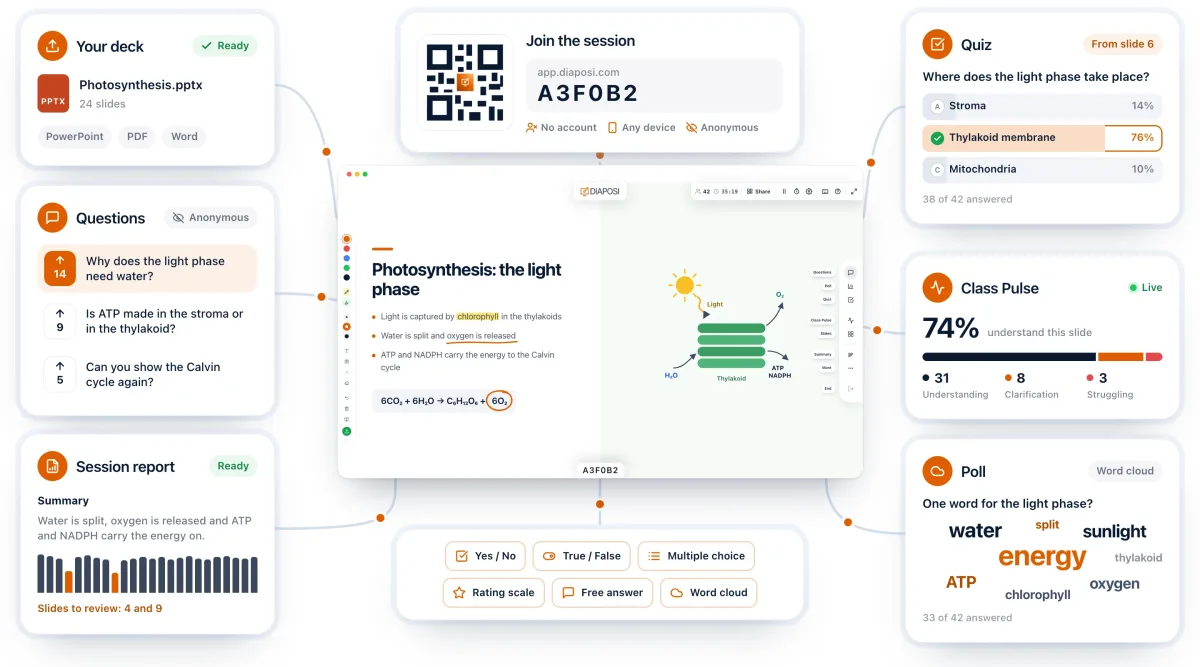
Diaposi Session has six kinds of poll, from a one-click Yes / No to a full-screen word cloud. Results appear under your slide while it stays on screen, so the room sees the question and its context together. A poll can close itself, so you are not left watching the count, and every poll stays in the session report.
Diaposi Session is part of Diaposi, the EdTech platform for interactive and measurable learning. Discover Diaposi Session
Frequently asked questions
How many polls should one presentation have?
- Three or four is plenty for an hour: one to open, one or two at the hard parts, one to close. Each poll should change something, even if only the next sentence you say.
What do I do if nobody answers the poll?
- Wait longer than feels comfortable, and say how many answers are in. Low numbers usually mean the question was unclear or people had no way to join, so check that the join code is still on screen.
Is Diaposi free?
- Yes. Diaposi is free, and there is no paid plan today.