

Any deck or PDF already contains its quiz: every heading is a possible question, every definition a possible answer. You can write the questions by hand, use question stems, or let a generator draft them. In Diaposi, a self quiz is made from your own PowerPoint, PDF or Word notes, on the chapters you choose, with every right answer shown in the report.
What makes a good quiz question from slides?
One idea per question, taken from something the deck actually says. A good question asks you to use the idea, not to spot a sentence you have seen: “Which of these is an example of…” beats “According to slide 12…”. Wrong options should be mistakes people really make, or the question tests reading, not understanding.
What are the three ways to write the questions?
- By hand. Go through the deck and turn each heading and each definition into a question. Slow, and the writing itself is revision.
- With question stems. Keep a short list of openings, such as “What is the difference between…”, “What happens if…” and “Why does…”, and apply them slide by slide.
- Generate, then check. Let a quiz generator draft the questions from the file. Fast, and only as good as your check.
How do you check a quiz before trusting it?
Read every question against the source. The answer marked right must be right according to your course, not in general. Remove questions about details nobody would be asked. Scanned PDFs and handwritten notes need care: if a machine cannot read the text, type the key passages first.
Once you trust the questions, use them the way active recall with lecture notes describes, and see practice tests vs flashcards for when a quiz is the right tool.
How a Diaposi self quiz helps
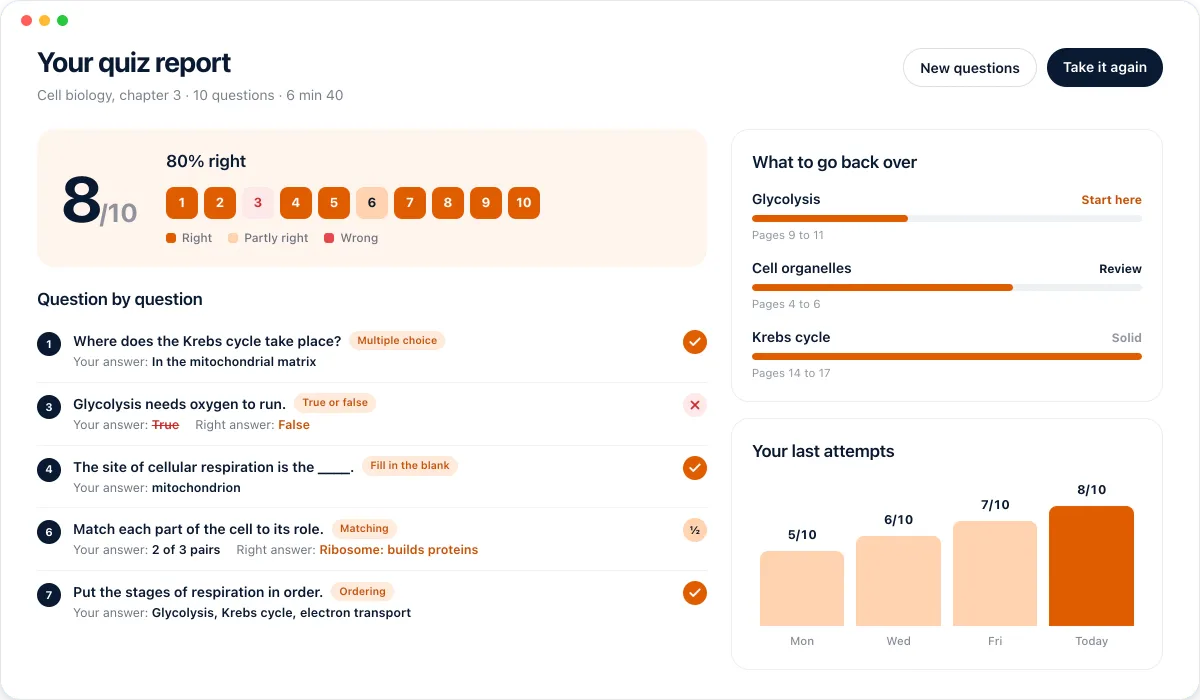
A Diaposi self quiz is made from your own PowerPoint, PDF or Word notes. You choose the chapters and the kinds of questions, answer the quiz, and get a report that shows every question with its right answer. You can then quiz yourself again on what you missed, which is the part a home-made quiz rarely gets.
The self quiz is part of Diaposi, the EdTech platform for interactive and measurable learning. Discover the self quiz
Frequently asked questions
How many questions should a quiz from one deck have?
- About one for every two or three slides that carry an idea. For a 30-slide lecture, 10 to 15 questions cover it without padding.
Can I make a quiz from a PDF?
- Yes. The method is the same as for slides. Diaposi makes quizzes from PowerPoint, PDF and Word files.
Is Diaposi free?
- Yes. Diaposi is free, and there is no paid plan today.