

You do not need to rebuild a deck to make it interactive. Keep the PowerPoint you already have, decide where the room should answer, and add a poll, a question or a quiz at those slides. In Diaposi Session you upload the file as it is, and participants join by QR code, with no account and no add-in.
Why are animations and hyperlinks not interaction?
PowerPoint’s own tools, such as animations, zoom, triggers and hyperlinks, change what you show. None of them lets the room answer. A deck with clickable menus is still a one-way talk if nobody in the audience can respond. Interaction starts when participants can vote, ask and be counted, and that needs a live layer on top of the slides.
How do you make the deck interactive in five steps?
- Decide where the room should answer. Three or four slides: the opening, the hard parts, the end.
- Turn those slides into a poll or a quiz. A question with a few options, or one word for a word cloud.
- Show a QR code on the first slide. People join from their phone while you introduce the session.
- Run it live and react. Read the result out loud and say what it changes.
- Review what each slide produced. The answers and the questions tell you what to fix for next time.
Do you need an add-in?
No. An add-in ties you to one computer and one version of PowerPoint. A browser tool that presents your file works on any machine, including the one in a room you have never used before. The complete guide to interactive presentations covers the other interactions, and how to use live polls in a presentation goes deeper on step two.
How Diaposi Session helps
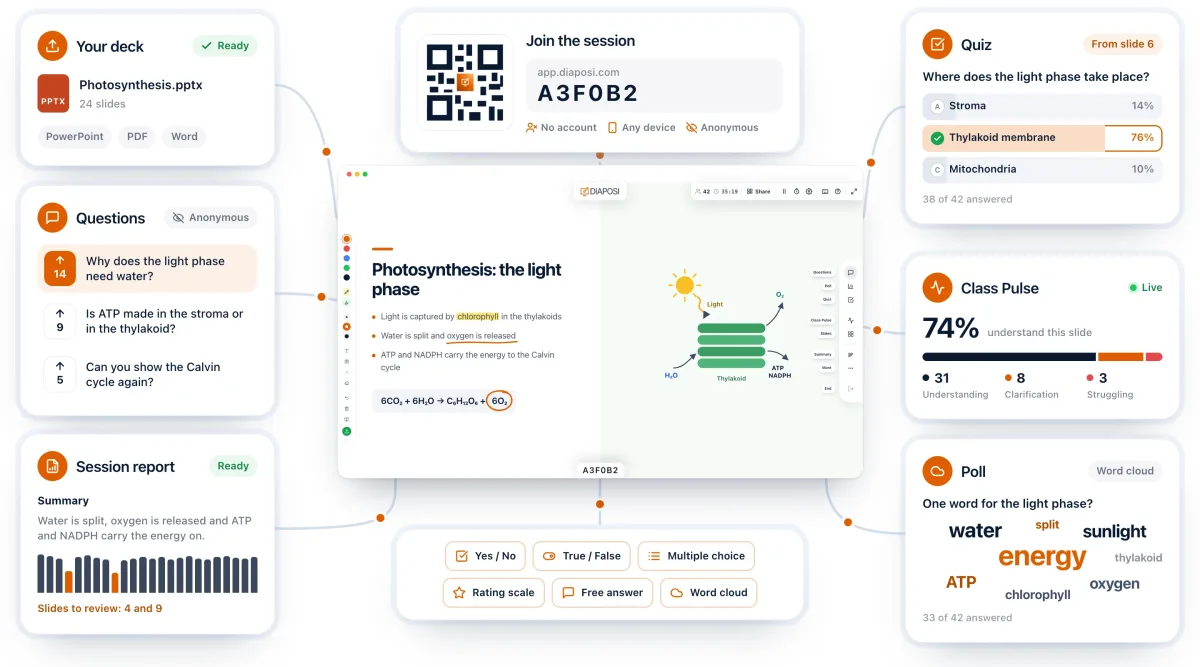
Diaposi Session presents your PowerPoint as it is: upload the file, share the code, and the slide takes the whole screen. Polls, quizzes built from your slides and anonymous questions run on top of it, with results appearing under the slide while it stays visible. Participants join with a QR code, with no account, and there is nothing to install.
Diaposi Session is part of Diaposi, the EdTech platform for interactive and measurable learning. Discover Diaposi Session
Frequently asked questions
Do participants need an account or an app?
- No. With a browser-based tool such as Diaposi Session, participants scan a QR code or type a short code and join from their phone’s browser. There is nothing to install and no account to create.
Can I make a PDF or a Word document interactive too?
- Yes. The method is the same for any file you present: choose where the room answers and add a poll, a question or a quiz there. Diaposi Session presents PowerPoint, PDF and Word files.
Is Diaposi free?
- Yes. Diaposi is free, and there is no paid plan today.