
Diaposi Studio: the interactive presentation maker for your PowerPoint or PDF
Start from your PowerPoint or PDF, or from scratch. Add pages, polls, quizzes and questions between your slides, see it in the preview, then start it live.
- Free to start, no credit card
- PowerPoint or PDF, up to 10 MB
What is Diaposi Studio?
Diaposi Studio is an interactive presentation maker: from one PowerPoint or PDF, or from scratch, you build a presentation the room takes part in from their own devices. Add pages from 22 page templates and live moments: an opening question first, then a poll, a quiz, a Q&A, a survey or a mock exam between your slides. The preview shows the room's screen with a participant's device beside it. Press Start now: participants join at diaposi.com with the session code, in their browser.
How Diaposi Studio works
Start from your PowerPoint or PDF, or from scratch
Drop one PowerPoint (.ppt or .pptx) or PDF, up to 10 MB, or start from scratch. Each slide comes in as a picture: animations, videos and links stay behind, and you build on top of it.
How to make a PowerPoint interactivePlace live moments between your slides
Drag a poll, a quiz, a Q&A, a survey or a mock exam between two pages, and add an opening question to begin with. For a quiz, a survey or a mock exam, write the questions yourself, reuse one you already made, or let Diaposi AI write them from your file. Each moment is a page of its own, ready before the room arrives.
Add pages and make it yours
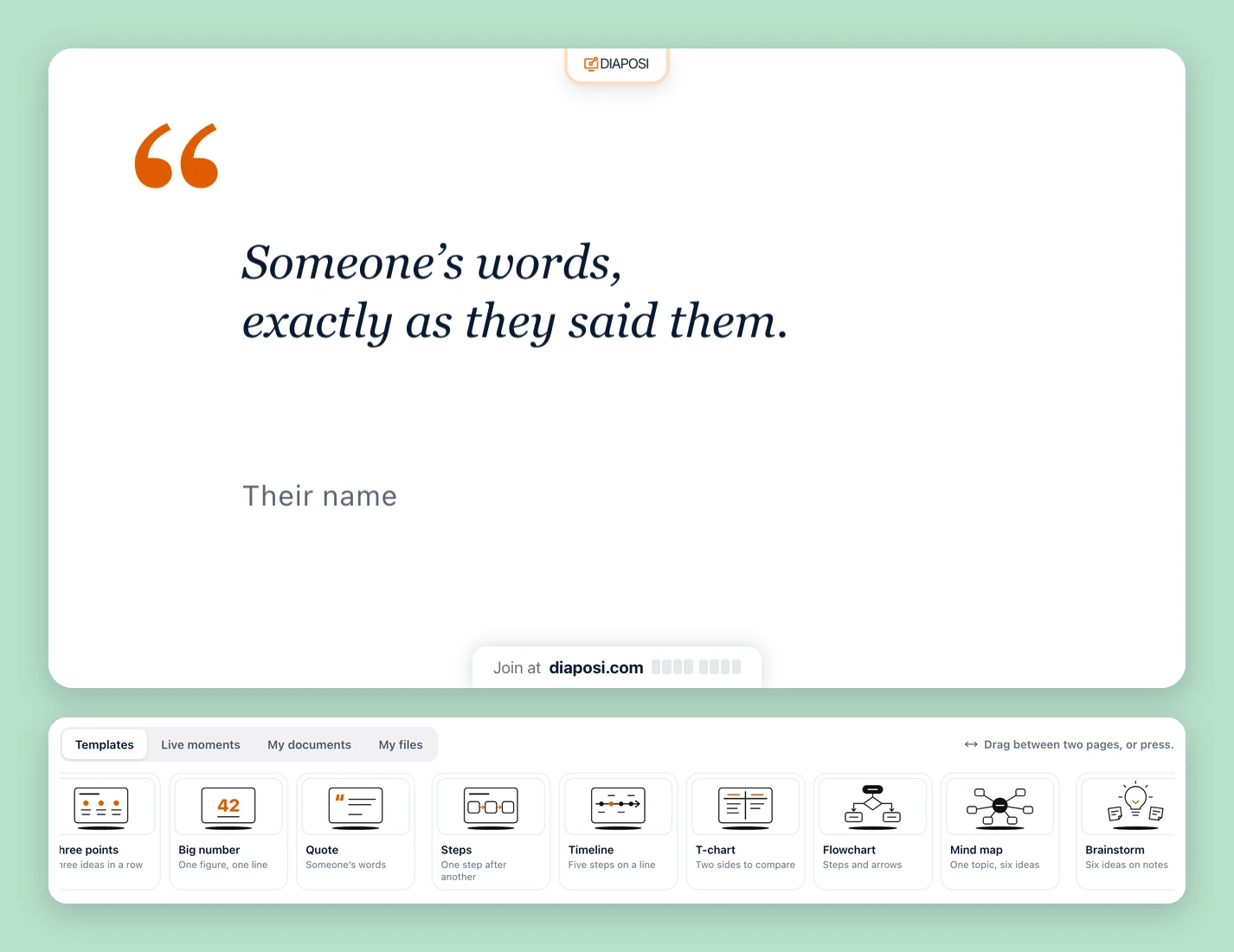
Choose among 22 page templates, from a title page to a mind map or a whiteboard page, and draw or write on any slide or template page with a pen, text, sticky notes, shapes and pictures. Then put your own logo on the room's screen, or none, and give your polls, quizzes, surveys and mock exams one colour.
See what the room will see, then start
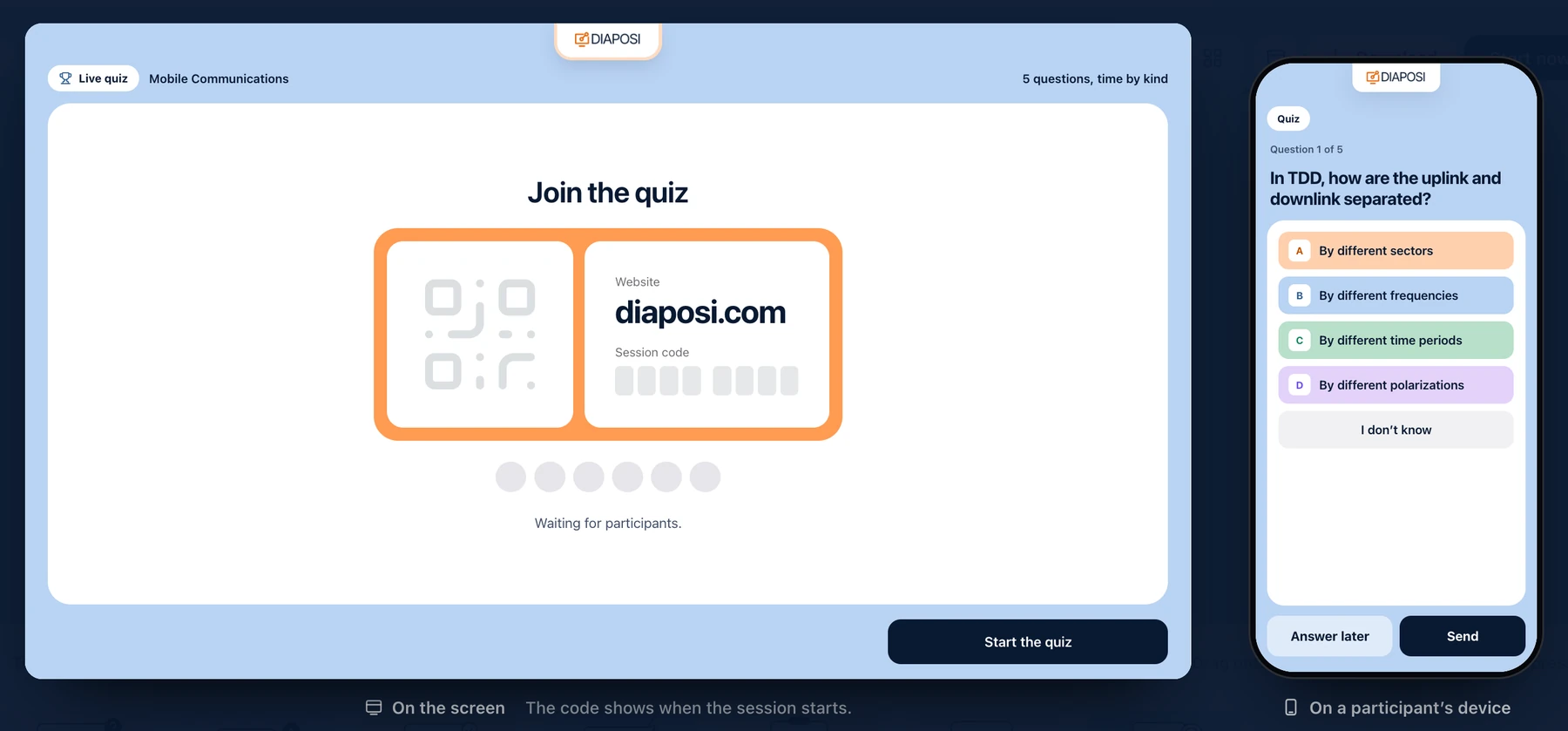
The preview shows each page on the room's screen with a participant's device beside it, and a check lists anything missing before you start. Press Start now: participants join at diaposi.com with the code, from their own device. You can also download the presentation as a PDF or as pictures.
How a live interactive presentation runsThe live moments in your interactive presentation
Opening question
Asked before you begin, answered from every device. On the closing page, always last, each participant says if their expectation was met.
Diaposi OpeningLive poll
Twelve kinds, from multiple choice and yes or no to a word cloud, a ranking or 20 points to share out. You show the results when you choose, or as votes arrive.
Diaposi PollLive quiz
Nine kinds of question, played together or at each participant's own pace, with a leaderboard at the end, after every question, or none.
Diaposi QuizLive Q&A
Questions sent from devices and voted up by the room. You pin one, answer it and mark it done.
Diaposi Q&ALive survey
Questions with no right answer, six kinds and up to 20 questions: one answer, several, yes or no, a rating, a number or a few words.
Diaposi SurveyLive mock exam
A timed paper the room sits on their devices, graded out of 20, anonymous or with a display name.
Diaposi Mock Exam
Prepared once, started again later: each start is a new session with its own report.
Frequently asked questions
Can I turn a PDF into an interactive presentation?
Yes. A PDF cannot collect answers on its own, so Diaposi Studio adds live moments around its pages: drop the PDF, or a PowerPoint (.ppt or .pptx), and each page comes in as a slide. One file per presentation, up to 10 MB. You can also start from scratch.
What happens to my PowerPoint animations, videos and links?
In Diaposi Studio, each slide comes in as a picture, so PowerPoint animations, videos and links stay behind, and the words on a slide cannot be edited. You add text, sticky notes, drawings and pictures on top of it, and live moments between your slides.
What can I add between my slides in Diaposi Studio?
Pages from 22 page templates, from a title page to a mind map or a whiteboard page, and live moments: a live Q&A, a live poll in 12 kinds, a live quiz with 9 kinds of question, a live survey and a live mock exam graded out of 20. An opening question can also open the presentation, with a closing page at the end.
Can Diaposi AI write the questions?
Yes, for a quiz, a mock exam or a survey: Diaposi AI writes them from your presentation's file. For a quiz, you choose the chapters, the kinds of question, how many and the difficulty. You read and change every question before the room sees it. You can also write your own, or reuse a quiz, survey or mock exam you already made.
Can I see what participants will see before I start?
Yes. Diaposi Studio's preview shows each page as the room's screen will show it, with a participant's device beside it. When you press Start now, a check lists anything missing, page by page, and takes you there.
Do participants need an app or an account?
No. Participants join at diaposi.com with the session code, from their own device, in the browser: nothing to install, no account to create.
Do I need Diaposi Studio to present live?
No. You can upload your slides in Host a session and go live at once, adding polls, quizzes and questions as you present. Diaposi Studio is for preparing first: you place pages and live moments between your slides, check them in the preview, then start it live, and start it again later as a new session.
Is Diaposi Studio free?
Yes. Hosting is free to start, with no card, and participants never pay. The paid plans, Starter and Pro, are for learners. Preparing and previewing a presentation in Diaposi Studio are open to every host.